
Character height
Off out of the box
To use it, set Config.Height.enabled = true in shared/config.lua and restart the resource. Try it on your server with two players first: see What it can't do.
Players choose their character's height in the creator, within a short range that still looks real: women can be shorter than the game's usual 1.81 m, men a little shorter or taller. Then the height stays. To change it, the player sends a request to the staff from the barber shop, and the staff accepts or denies it in the panel. A request nobody answers in 30 minutes is deleted by itself, and the player is told.
The whole character is scaled evenly: clothes, hair, heels and tattoos come along, and the feet stay on the floor, with heels or without. Only the freemode man and woman have a height; any other ped keeps the game's.
The ranges
Out of the box nobody changes until they choose:
| Shortest | Usual | Tallest | |
|---|---|---|---|
| Women | 1.59 m | 1.81 m | 1.81 m |
| Men | 1.76 m | 1.81 m | 1.86 m |
Women can only be shorter than the usual height; men move much less, both ways. You set the ranges in Config.Height.female and Config.Height.male, in cm, barefoot, to the crown of the head (without the hair). The config checks them when the server starts and says in the console what it fixed:
- each sex within the code's limits: women 156 to 181 cm, men 172 to 190 cm;
min ≤ default ≤ max;- with
rule = 'range'(out of the box), the men's shortest above the women's shortest, the women with more range than the men, and the men going down at most half of what the women go down; - with
rule = 'strict', no man shorter than any woman (the women's tallest at most the men's shortest).
units = 'ft' shows heights in feet and inches instead of metres.
In the creator
On the first step, under Male / Female, there's Height: − and + by 1 cm (or the arrow keys), a slider over the sex's range with the usual height marked, both sexes' ranges written out, and a ruler next to the character. Each change shows on the character right away, only on the player's screen. Switching sex goes back to that sex's usual height. Finish character saves it, and the finish sheet says the sex and the height chosen ("Character: Female", next to the height).
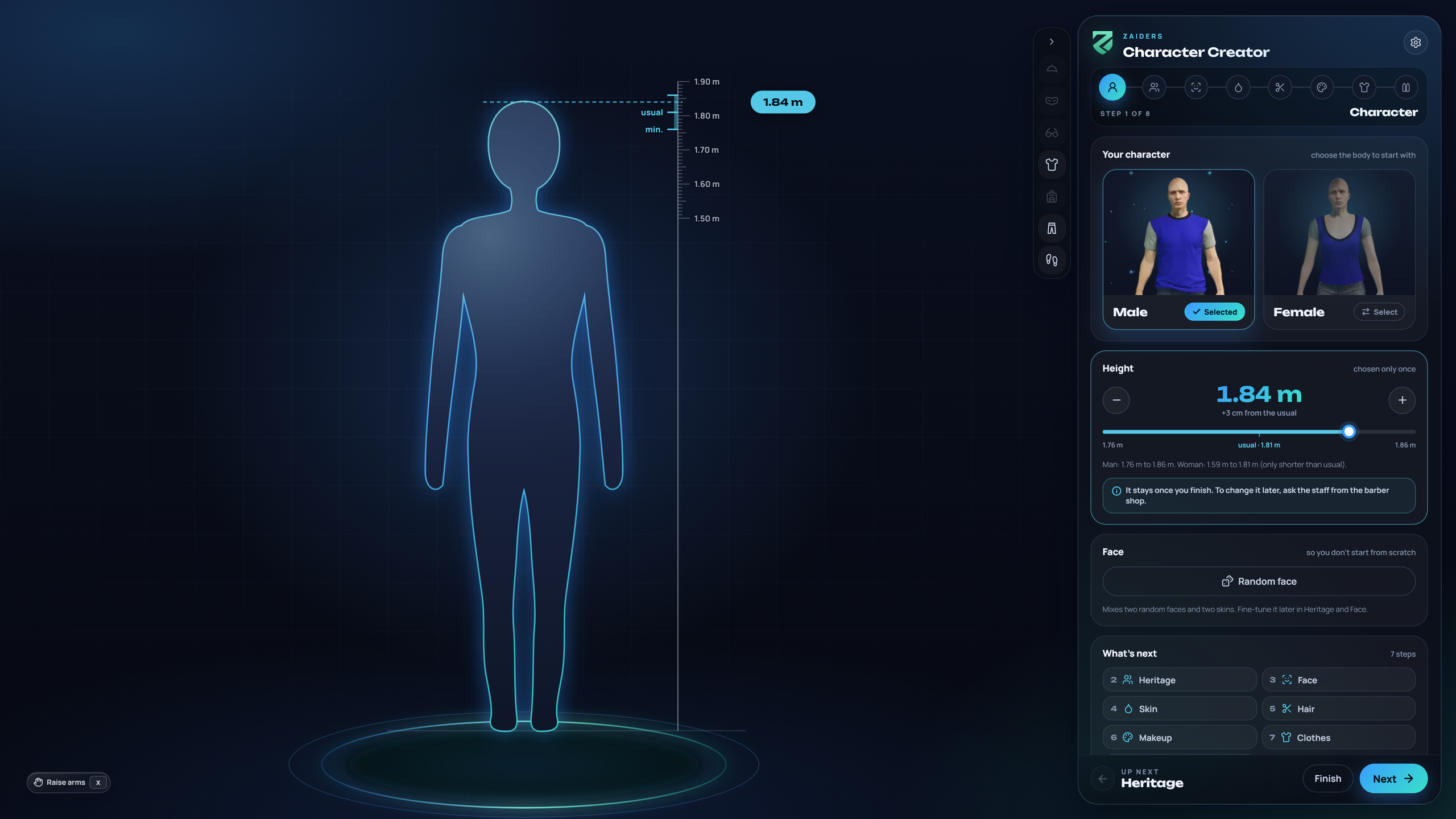
With Config.Height.creator = false the creator doesn't show it: new characters get the usual height and can choose once at the barber's (below).
At the barber's: Body
The barber shop has a sixth tab, Body, for the freemode man and woman:
- The height, read only, and where it sits in the sex's range.
- Ask for a height change opens a sheet: the height wanted (within the range), See how it would look (only on the player's screen while the sheet is open), an optional reason of up to 140 letters (
requests.reason), and Send request. - The request waiting shows with its countdown and Cancel request. One request at a time per character.
- After a request is denied, expires or is cancelled, the next one waits
requests.cooldownminutes (15); after an accepted change,requests.afterChangedays (7). - The height is never a line in the cart. With
requests.priceabove 0, it's charged when the staff accepts. - A height only previewed is never kept: leaving the barber with one asks first (You have unsaved changes), and its row says "Only you see it: to keep it, choose it in Body." If it's the only change, there's no Save changes.
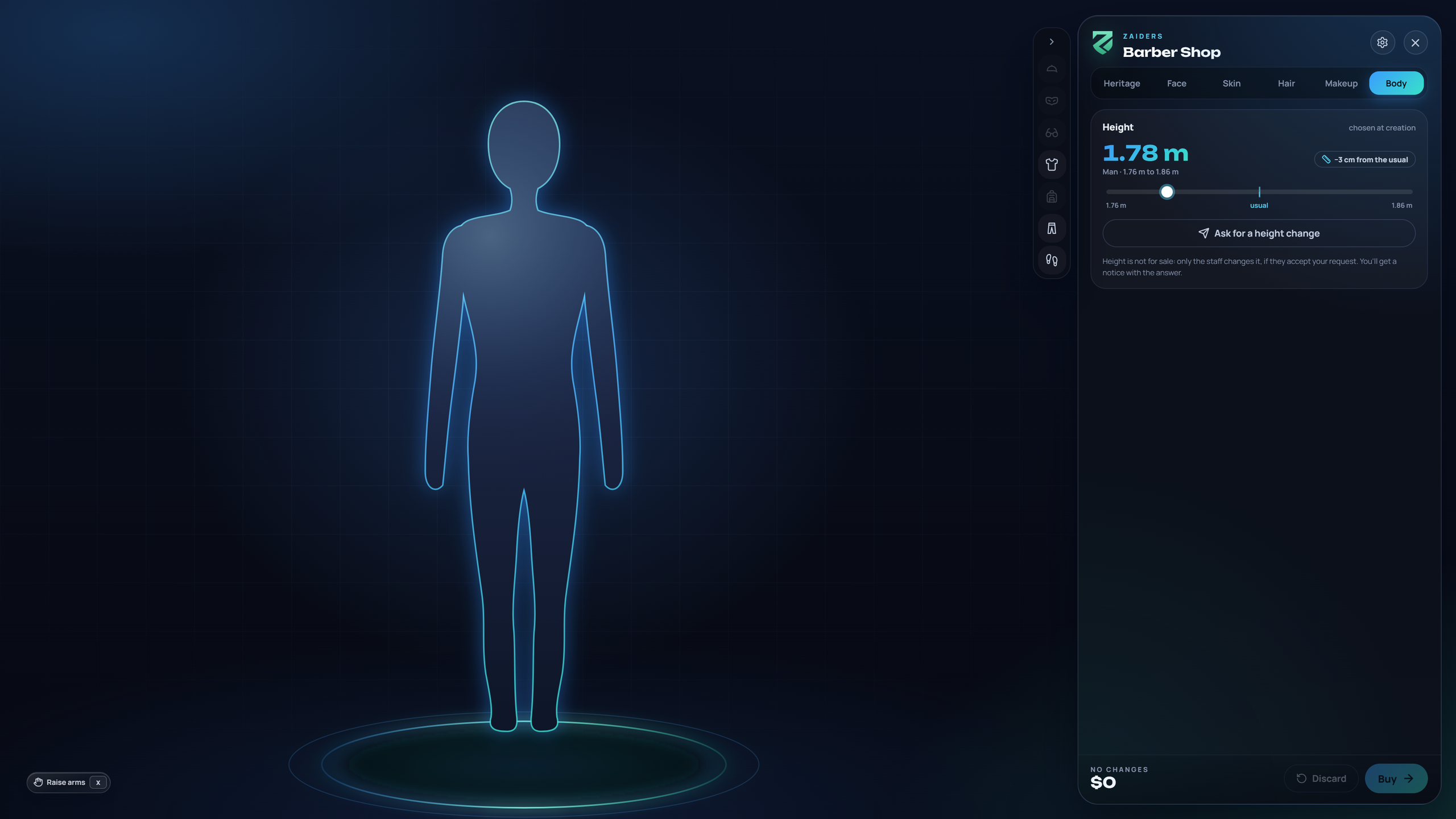
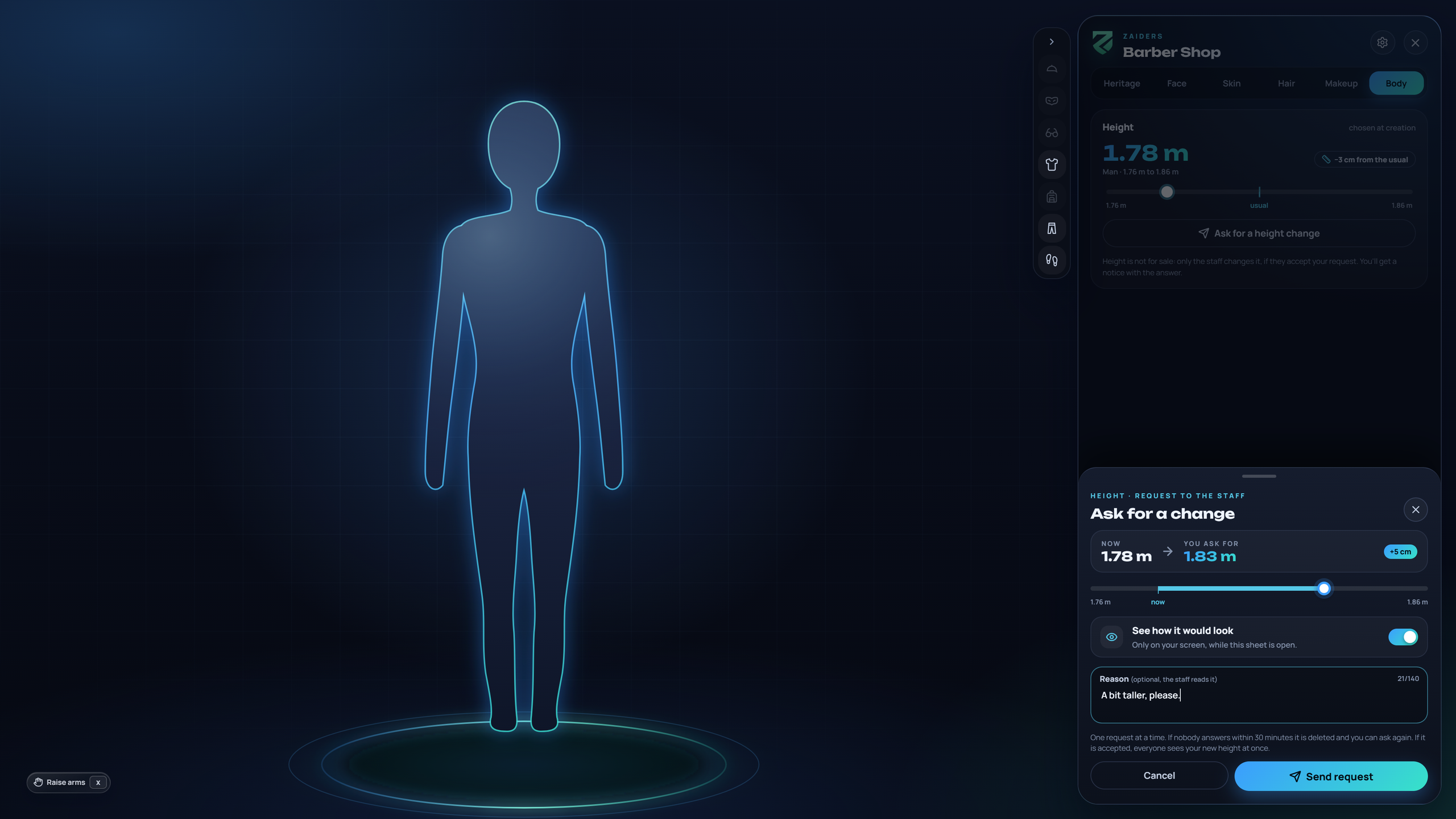
With requests.enabled = false the tab only shows the height: on that server it can't be changed once chosen.
Characters from before the height: a character made before you turned height on chooses it once here, without the staff, with the same control as the creator and a confirmation. It can do so until chooseOnceDays days (30) after the first start of the server with height on (0: no deadline). After that, only requests. chooseOnce = false turns this off.
The staff
The admins answer the requests, and so does Config.Height.requests.staff:
staff = { aces = { 'zaiders_appearance.height' }, qb = {}, esx = {}, jobs = {}, onDuty = false },For example, your moderators, in server.cfg:
add_ace group.mod zaiders_appearance.height allowIt also takes qb-core permissions (qb = { 'mod' }), ESX groups (esx = { 'mod' }) or a job from a grade (jobs = { police = 3 }; with onDuty = true, only on duty).
The staff online get a notice with each new request. They answer in the panel, in Height requests (/zappearance requests; staff who aren't admins see only that section). With the height off, that command is nobody's, not even the admins'.
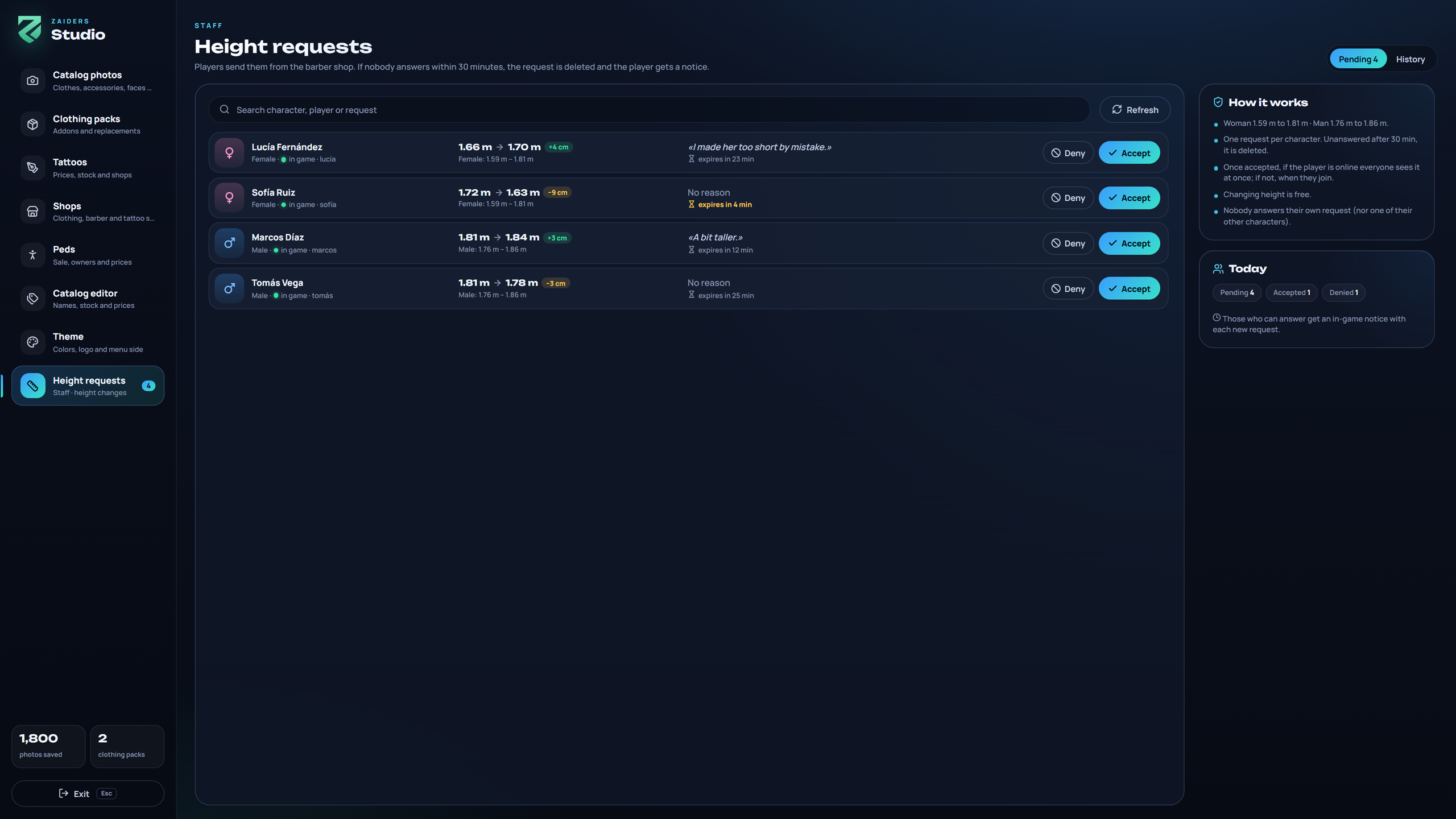
- Each row shows the character and whether they're in the game, from → to with the difference, the sex's range, the reason, and how long it has left (yellow under 5 minutes).
- Accept changes that character's height at once for everyone, or when the player comes back to that character. With a price, only with the player online on that character.
- Deny asks first for an optional note that the player reads.
- Nobody answers their own request, nor one from another of their characters.
- History keeps the answered ones
requests.historydays (30). Every step goes to the server console.
The player is told when their request is accepted, denied or expires (or when they come back, if they were away).
What it can't do
GTA V has no real scale for a ped, so ZAIDERS Appearance draws each character smaller or taller on every screen. That has limits, and they're the reason the ranges are short:
- The hitbox is not scaled. Bullets, hits, doors and ceilings use the game's body, of 1.81 m. With
combat = 'fair'(out of the box), whoever holds a firearm shows the game's height on every screen, and while you aim everyone shows it on your screen: what you see is where the bullets land. Withcombat = 'keep'the chosen height always stays, and the head of a 1.59 m character is seen up to 20 cm below where a shot hits. Knives and punches without aiming keep that gap. - In vehicles, ragdoll, dead, swimming, climbing, on ladders, in melee and sitting on the map's benches, characters show the game's height, with a short ramp.
- The feet slide a little when walking: the animation's steps are the game's.
- NPCs with the freemode model (the photo studio's mannequin, shop clerks) stay at 1.81 m.
- Other players see it with OneSync on. Without OneSync, each player sees only their own height (the console says so once).
Sitting emotes
So nobody sinks into a chair, add the sitting and lying animations of your emote menu to Config.Height.pause.anims, each one { 'dictionary', 'animation' }, or call the export from it:
exports.zaiders_appearance:pauseHeight(true)   -- sitting down: the game's height on every screen
exports.zaiders_appearance:pauseHeight(false)  -- standing up
The map's benches (pause.scenarios) are already handled.
Performance
Each player's game draws only the players around it who have a height of their own, within distance (50 m), fading to the game's height over the last 10 m. With more than maxPeds (48) of them nearby, the radius shrinks slowly. While nobody near has a height of their own, which is most of the time with the default ranges, nothing runs each frame.
Turning it on and off
It ships with Config.Height.enabled = false: nothing runs (no threads, state bags, events or screens), nobody chooses or asks, everyone shows the game's height, and saved heights stay for when you turn it on again. true turns it on when the resource restarts. The chooseOnceDays deadline counts from the first start with height on.
If you use another height script, add its folder name to Config.Height.owners: while it's running, this one stands aside.
The data
Two tables, zaiders_body (each character's height) and zaiders_height_requests (the requests). They're in Appearancez.sql, and the resource also creates them by itself the first time it needs them, so updating needs nothing.