
Catalog photos
The menu shows a photo of each garment, and a drawing of its slot when there's none. You take the photos yourself from the admin panel, inside the game: a studio photographs every garment on its own, with a transparent background. You need no screenshot resource, no outside service and no command in F8.
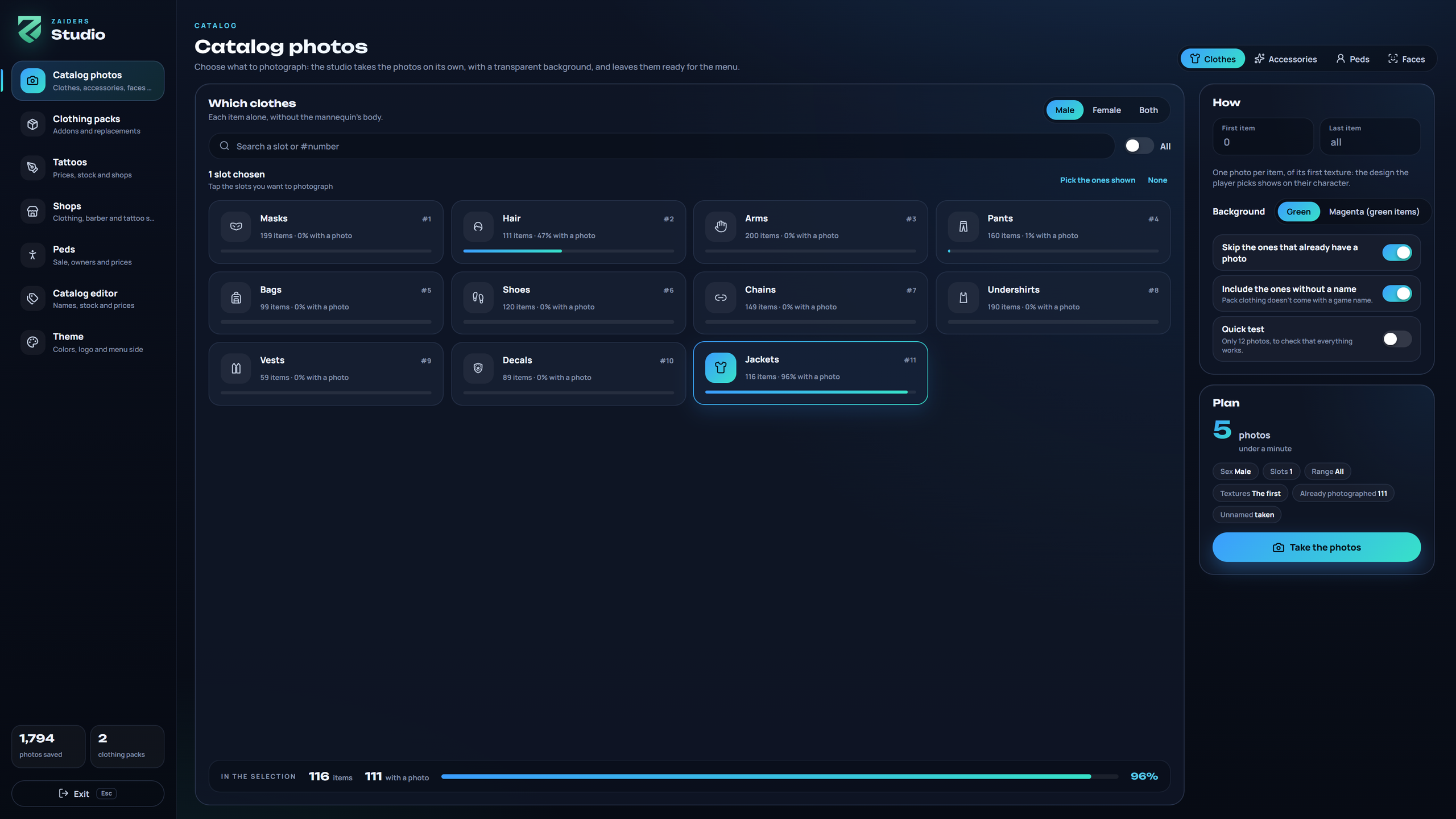
How the studio works
- You go to your own dimension, high in the sky over the sea. Your character stays invisible and still under an invisible platform, and comes back where it was when you leave.
- The garments go on a mannequin only you can see. Its body is invisible, and its head is painted the background's color, so only the garment is left in the photo.
- Each photo is cut out from the green background, cropped around the garment, and saved twice: 256 px for the menu and 512 px kept on the server.
- It takes one to two seconds per photo. It works in batches and picks up where it stopped.
Before you start
Use a test server
Take the photos on a test server with the same clothing packs as your live one, then copy the zaiders_fotos folder over. While the studio runs, your character is invisible and still.
- Run the game windowed or in borderless fullscreen.
- Turn FXAA off, and turn off ReShade or NVE if you use them. They change the colors and edges of the photo.
- Keep the game visible while it runs. If the game is minimized or another window covers it, the studio waits and goes on by itself when you come back. Photos taken while the game wasn't visible come out black: the panel counts them and offers Delete the broken ones.
- Join once with an admin after installing or after changing clothing packs, so the server knows which garment is behind each number.
Taking the photos
Open the panel on Catalog photos
/zappearance photos.Choose what to photograph
At the top: Clothes, Accessories, Peds or Faces. Pick the sex (Male, Female or Both) and click the slots you want. Each slot shows how many garments it has and what share already has a photo. All picks every slot.
Choose how
- First item and Last item: a range of garment numbers, or all of them.
- Background: Green, or Magenta for green garments.
- Skip the ones that already have a photo: on, it only takes what's missing.
- Include the ones without a name: pack clothing doesn't come with a game name.
- Quick test: only 12 photos, to check that everything works.
One photo is taken per garment, of its first texture: the design the player picks shows on their character.
Check the plan and start
Plan says how many photos it will take and how long it will last. Click Take the photos.
Let it run
The panel hides and a meter in the top left shows the progress, the garment being taken, the last photo, and Pause / Resume and Stop. Esc also stops. What was saved stays saved. When it ends, a notice says how many photos were saved, how many were empty and how many failed.
Send them to the players
Run
ensure zaiders_fotosso players get the new photo list. A photo taken again for a garment that already had one needs nothing: the menu asks the server whether it changed.
Glasses
Each pair of glasses is photographed twice, with the background and the head green and then magenta. What changes between the two photos is what shows through the glass. The result keeps the frame and the glass with their color and transparency, without eyes or a face behind.
If the game ever doesn't let the head be painted, the glasses are skipped (the eyes would show) and the end message says so. Everything else is still taken. If you had older photos of glasses showing eyes, take them again with Skip the ones that already have a photo off.
Hair
Hair photos use one hair color. Pick it in Catalog photos with Hair chosen, under Hair colour: the game's colour and highlight. It's saved for every admin (datos/estudio.json). To redo the hair photos you already have, turn off Skip the ones that already have a photo.
Faces and peds
- Faces photographs the game's faces from the front, bald and without makeup. They show in the barber's Heritage, and the game's own portrait is used for faces without one.
- Peds photographs whole peds, from the game and your addon ones. The ped shop shows them before the pictures from FiveM's documentation.
How players get the photos
| Mode | How it works | Set it with |
|---|---|---|
| On demand (default) | Players don't download the photos when they join. The menu asks the server for the ones on screen, a few at a time, through the game's own connection. Each player keeps them, so next time they show at once. Each player gets at most bps bytes a second and perMinute photos a minute. | Config.Photos.onDemand = true |
| All on join | Every player downloads every photo when they join. | Config.Photos.onDemand = false, and uncomment 'fotos/*.webp' and 'tatuajes/*.png' in zaiders_fotos/fxmanifest.lua. |
| From a CDN | Upload the fotos/ and tatuajes/ folders to a web server or CDN. Players download the photos they look at from there. | Config.Photos.url = 'https://...' |
On demand, only the pictures in fotos/ and tatuajes/ are sent, by their exact name. The master/ and datos/ folders never leave the server.
Tattoo pictures
The game's tattoos show their own picture. For your addon tattoos, the server can make a small picture of each one from its own texture:
- in the panel: Tattoos → Images → Make the missing ones (or Redo all), or
- in the server console:
zappearance_imagenes_tatuajes(zappearance_imagenes_tatuajes todasmakes them all again).
Then run ensure zaiders_fotos.
Cleaning and repacking
zappearance_limpiar_fotos, in the server console, deletes the photos that came out a single color.- Each photo is named after the garment's pack and its number inside the pack, such as
m_c11_mypack_002_003_00(male, jacket, packmypack_002, garment 3, texture 0). Adding another pack doesn't change those names. Repacking a pack does, so take that pack's photos again. The panel's Clothing packs section shows which collections have photos.
The zaiders_fotos folder
| Folder or file | What it is |
|---|---|
fotos/ | What the menu shows: 256 px WebP with a transparent background. |
master/ | The same photos at 512 px. They stay on the server. |
manifest.json | Which garments, faces and peds have a photo. The menu reads it. |
datos/ | Each photo's fingerprint, each garment's game name, and the packs' marks. Server only. |
tatuajes/ | The pictures of the addon tattoos, and their lists. |
The panel writes all of this; don't edit it by hand. Keep this folder when you update ZAIDERS Appearance.